How to see whether someone viewed your PDF
By DeckPeek
You can see recorded PDF views when someone opens your document through a DeckPeek share link. Upload the PDF, create a link, and send that URL. Its analytics can then show opens, viewing time, and activity on individual pages.
This starts with the hosted link. Uploading a PDF today cannot reveal who opened a copy you attached to an email last week, and DeckPeek cannot follow a downloaded copy after it leaves the viewer.
Set up a PDF you can track
Decide whether you need activity for an audience or for a particular conversation. One shared link is useful for a group. Separate links make it easier to distinguish a client review from a partner introduction without uploading the same PDF twice.
Upload and preview the PDF
Go to Documents and upload the file. Once it is ready, check the browser preview so you know the recipient will receive the intended pages.
Create a named share link
Use an Internal name that describes the audience or send, such as “Client review — first draft.” This name stays within your workspace.
Choose whether to ask for an email
Turn on Require viewer email if you want the visit to include an address supplied by the viewer. Otherwise, the link can record activity without an email address.
Share the URL
Create the link and send it instead of the file attachment. Activity is measured in the hosted viewer, so make that URL the main way to review the document.
Check the link and reporting window
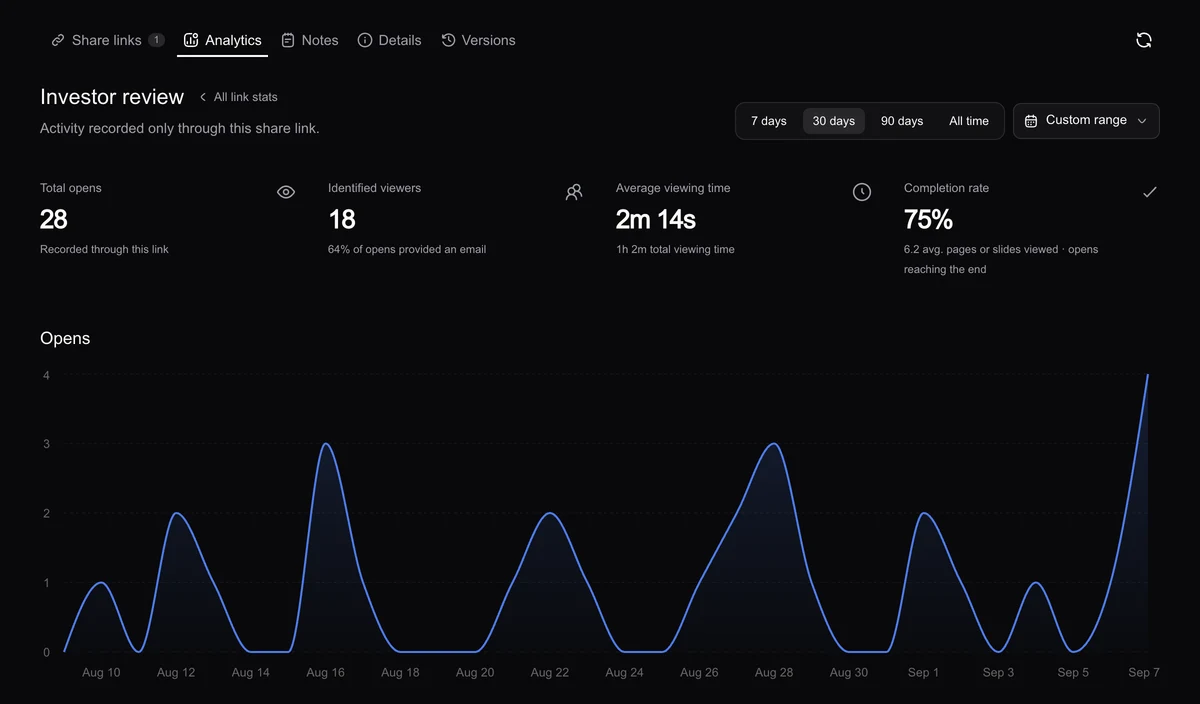
Open the document’s Analytics tab and select the link you sent. Choose a date range that includes the send and review period. Start with recorded opens, then inspect viewing time and the pages reached to understand the shape of those sessions.
Total opens counts sessions, so it is not a count of unique people. One reader can open the same link several times. A forwarded link may also be used by someone other than your original recipient.
- Viewing time estimates active time in the visible viewer; it is not simply how long a tab existed.
- Completion means an eligible session reached every page. It does not prove comprehension.
- Page activity helps you see which parts were visited and where recorded time accumulated.
Understand what “who viewed” means
On Free, a collected email address is self-reported. It helps organize activity, but anyone using the link can enter an address. Pro can require email verification, which checks that the viewer can receive a code at that address at that time.
Neither a named link nor an email address proves who was physically reading the PDF. Use that context alongside the conversation you already have with the recipient.
What if there are no recorded views?
First confirm that you are looking at the correct link and date range. Check whether the URL is active, whether access requirements can be completed, and whether you sent the link rather than an attachment.
No recorded activity is not conclusive proof that the recipient ignored the document. Blocked scripts, network conditions, or reading a separate file copy can leave an incomplete picture. A simple delivery check is a better next step than treating an empty chart as a verdict.
For supported formats, plan details, and individual settings, visit the DeckPeek help center.