How to share a pitch deck and track engagement
By DeckPeek
To track engagement with a pitch deck, share a hosted link to your PDF or PowerPoint file. When someone opens that link, DeckPeek can record the visit and activity by slide. A copy sent as an email attachment does not provide that viewing history.
Start with the deck you already have. The useful preparation is deciding who each link is for and what you want the next conversation to cover.
Prepare the version you want people to see
Check the deck’s title, contact details, and final slide before uploading. A reader should understand what you are asking for and how to respond without returning to the original email. Remove internal notes or material that does not belong in this conversation.
DeckPeek accepts PDF and PPTX. PowerPoint files are prepared as PDF viewer copies, so review the resulting pages before sending. If your story depends on a particular layout, check charts, page order, and small labels in the browser preview.
Give each conversation its own link
Separate links let you review one investor’s or team’s activity without mixing it with your wider outreach. They can all point to the same document, with independent access settings.
Upload the deck
Open Documents, upload your PDF or PPTX, and wait until its viewer copy is ready. Open the document and check its preview.
Name the conversation
Create a share link and enter an Internal name such as “Investor introduction — September.” Only your workspace members see this name.
Choose the access settings
Decide whether to require a password or viewer email, set an expiration, and show the download button. Use the settings that fit this recipient.
Send the link with context
Select Create link and copy its URL. Include a short message explaining why you are sharing the deck and what you would like to discuss.
Read the activity as a whole
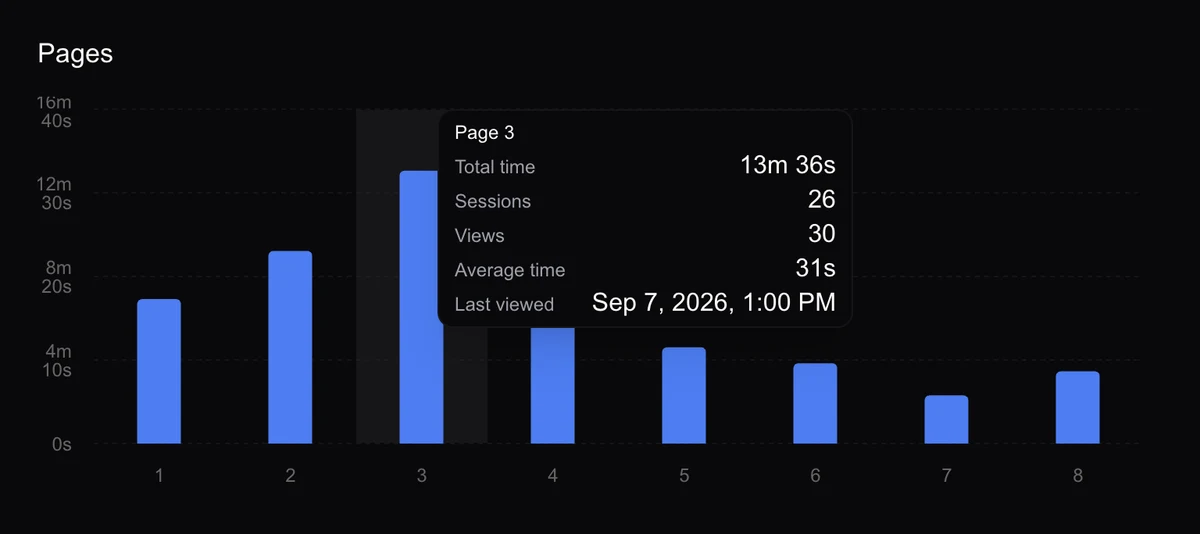
Open the document’s Analytics tab after sharing. Review the relevant link and date range, then compare opens, viewing time, completion, and activity by slide. A single total can hide the difference between a brief visit and a session that reached the whole deck.
For example, a return visit with time on the business model slide gives you a possible topic for the next call. It does not tell you whether the reader liked the model or found it confusing. Completion means every slide was reached, rather than proof that every slide was read.
Turn a signal into a useful follow-up
Keep the message grounded in the conversation: “Would a breakdown of the revenue model be useful before our call?” is more helpful than claiming to know what someone thought from a chart. If the link has no recorded activity, check the link and ask whether the deck reached them.
A link can be forwarded, and a collected email is self-reported unless verification is enabled. Browser and network conditions can also affect measurements. Use analytics to choose a better question, then let the recipient’s response guide you.
For supported formats, plan details, and individual settings, visit the DeckPeek help center.